DNS Record Types Explained
INTRODUCTION TO DNS
🌐 What Happens When You Type a Website Name in a Browser?
When you type a website name in your browser, something interesting happens behind the scenes.
To open a website, the browser needs data.
Sometimes this data is already available in the cache, so the site loads instantly.
But other times, the browser must request the data from a server.
The problem is — the browser doesn’t know where the server is or which server to talk to.
There are billions of servers on the internet, and the browser has no direct way to identify the correct one.
And there’s an even bigger problem:
Humans are good at remembering names, not numbers.
Servers are identified using IP addresses (numbers), which can be difficult to remember.
That’s why every server IP is mapped to a domain name, so instead of remembering numbers, we only remember names.
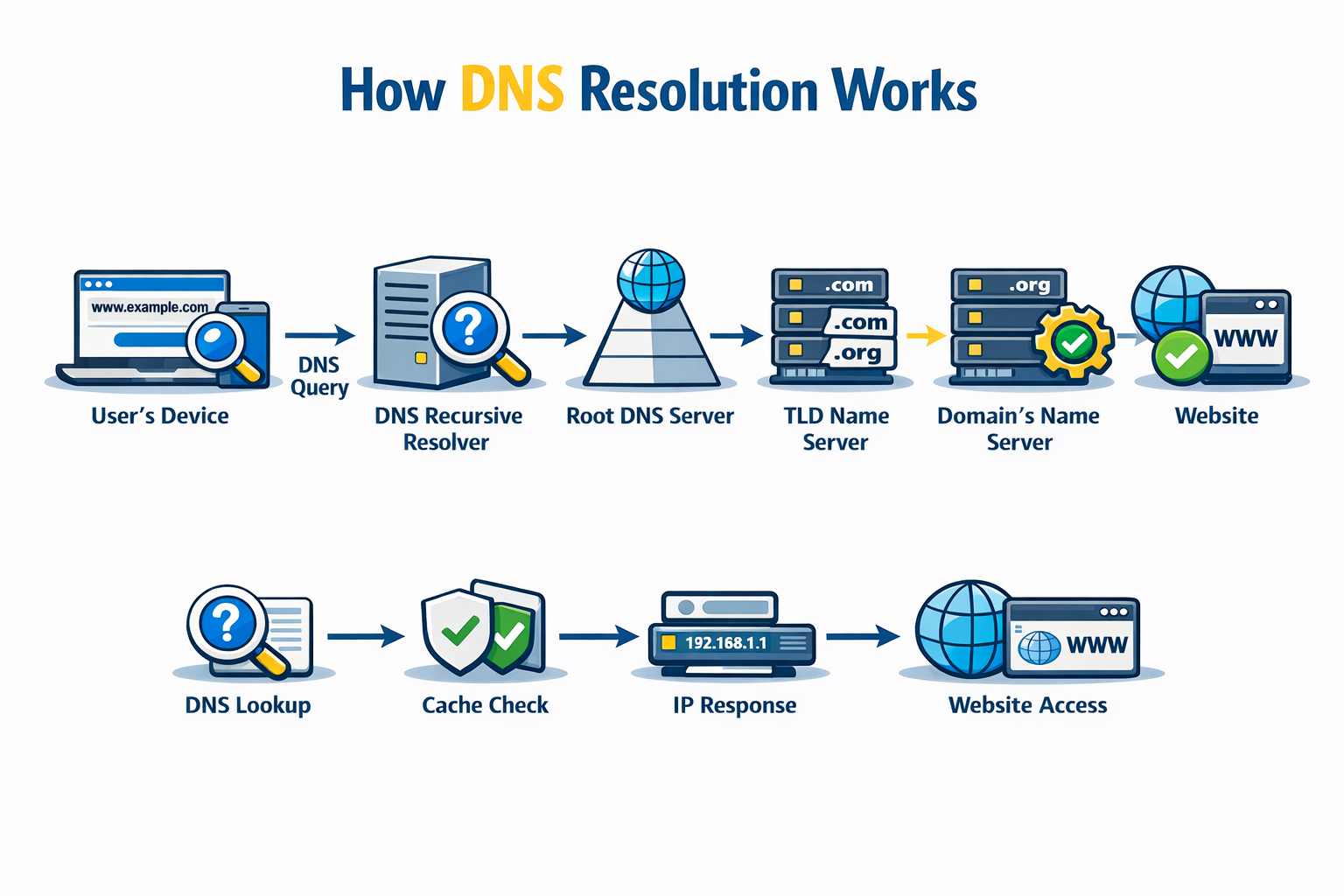
To find the correct IP address for a domain name, the browser relies on DNS.
📖 What is DNS?
DNS (Domain Name System) maps a domain name to an IP address, allowing the browser to locate the correct server.
Simply put:
DNS is the phonebook of the Internet.
Want to know more about it? Try this →
DNS RECORDS AND THEIR NEED
DNS record - It is made up of two words, DNS and record. We understand that we are talking about the record. So, what is a record?
A record = one unit of data that stores specific information.
A DNS record is a piece of information stored in DNS that tells the Internet how to handle a domain name.
It tells things like:
Where the website server is
Where emails should go
Who manages the domain?
Which domain points to which name
If there is no record, who will answer these questions?
This is the reason we need a DNS record.
TYPES OF DNS RECORD
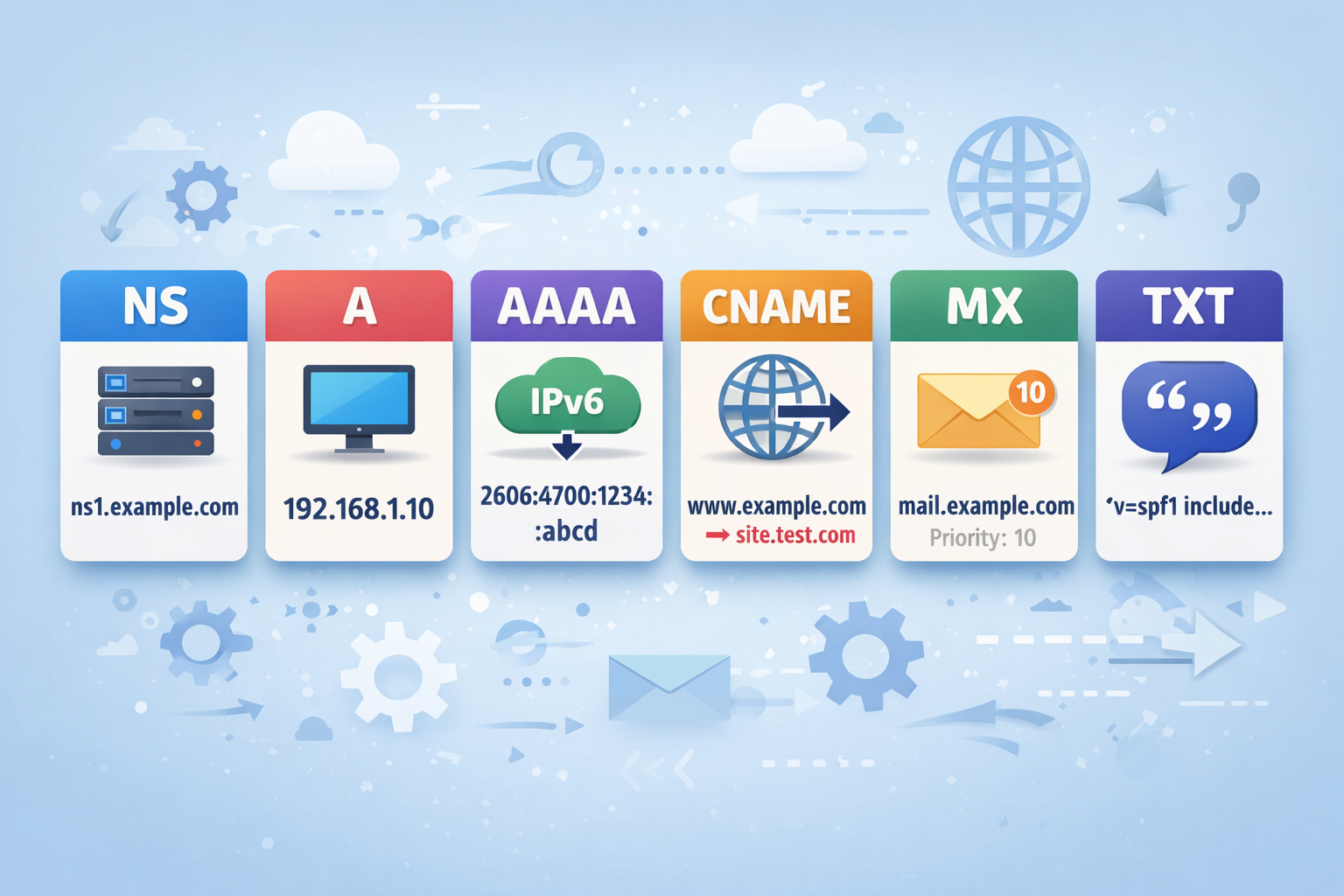
NS Record
NS stands for Name Server.
An NS record tells the Internet :
Who is responsible for managing the DNS records of a domain?
For example:
| example.com | record type: | value: | TTL |
| @ | NS | ns1.exampleserver.com | 21600 |
NS always points to the authoritative server, not an alias. That is why an NS record can never point to a CNAME record.
A Record
A stands for Address.
An A record maps a domain name to the IPv4 address. You might be thinking what is IPv4?
You’re like, we already know what the IP address is. But What is IPv4?
Simple IPv4 is Internet Protocol version 4, this version use 32 bit protocol that assign IP address to your device. But if a website has an IPv6 address, it will instead use an “AAAA“ record.
A record = domain → server IP
To get the IP address in IPv4 format, we use an A record.
EX:-
example.com A 192.168.1.1
AAAA Record
AAAA stands for Address(IPv6).
An AAAA record maps a domain name to an IPv6 address. Now your question is, what is IPv6?
IPv6 - Internet Protocol version 6, this version use 128 bit protocol that assign IP address to your device.
Ex:-
example.com AAAA 2001:db8:85a3::8a2e:370:7334
CNAME Record
CNAME stands for Canonical Name.
A CNAME record maps one domain name to another domain name.
In simple words:
CNAME = name → name (alias system)
Ex:-
www.example.com CNAME example.com
A CNAME record cannot exist with other records on the same name
(No A, MX, NS, TXT on the same domain label). What does that mean?
Ex:-
example.com CNAME site.com
example.com A 192.168.1.1
This is wrong because the same domain is used for an alias and for a real identity.
So a valid DNS setup is:-
Pure-alias:-
blog.example.com CNAME example.com
or Real Identity:-
example.com A 192.168.1.1
That means a domain name can be either:
a real identity (A, MX, TXT, NS...)
or an alias (CNAME)
It cannot be both.
MX Record
MX stands for Mail Exchange.
An MX record tells the internet:
Where emails for a domain should be delivered.
In simple words:
MX record = domain → mail server
Ex:-
| example.com | record type: | priority: | value: | TTL |
| @ | MX | 10 | mailhost1.example.com | 45000 |
| @ | MX | 20 | mailhost2.example.com | 45000 |
MX records use priority values to decide:
Which mail server should be used first, and
Which server should act as backup?
TXT Record
TXT stands for Text.
A TXT record stores extra text-based information about a domain.
In simple words:
TXT record = extra instructions + verification info
Ex:-
| example.com | record type: | value: | TTL |
| @ | TXT | "This is an awesome domain! Definitely not spammy." | 32600 |
TXT records are used for:
Domain ownership verification
Google Search Console
SSL verification
Email security (SPF, DKIM, DMARC)
Service authentication
🧩How all DNS records work together for one website
A website never uses a single DNS record; it uses multiple DNS records. Each record solve there problem solves a different problem.
Let’s take one domain as an example:mywebsite.com
NS    → ns1.cloudflare.com
A     → mywebsite.com → 34.120.10.5
AAAA  → mywebsite.com → IPv6 address
CNAME → www.mywebsite.com → mywebsite.com
MX    → mail.mywebsite.com (priority system)
TXT   → verification + email security
When a user searches mywebsite.com, the DNS lookup process begins.
First, DNS uses the NS record to find the root server responsible for the .com domain.
This tells the system which DNS server manages the domain.
Then, to locate the actual server:
The browser uses the A record to get the IPv4 address of the server that stores the data of
mywebsite.com.If the network uses IPv6, the browser uses the AAAA record to get the IPv6 address.
Now, users may type:
Both point to the same website because of the CNAME record, which maps:
www.mywebsite.com → mywebsite.com
So both names load the same server.
If someone sends an email to the domain:
user@mywebsite.com
The MX record decides:
Where the email should go
Which mail server should receive it
How mail routing happens
For domain verification, service authentication, and email security, the website uses TXT records.